TwinkleTray vs DisplayBuddy: Best Alternative (2026)
Compare DisplayBuddy and Twinkle Tray for Windows brightness control. See the full feature comparison, common problems, and which app is right for you.
If you use an external monitor on Windows and want software brightness control, you have two popular options:
- Twinkle Tray: A free, open-source brightness slider app available on the Microsoft Store and GitHub
- DisplayBuddy: A Windows and Mac app that controls brightness, contrast, volume, presets, and more across virtually every external monitor brand
Both apps use DDC/CI to communicate with your monitors. But the feature sets are quite different once you go beyond basic brightness. Here is how they compare.
Feature Comparison: DisplayBuddy vs Twinkle Tray
| Feature | DisplayBuddy | Twinkle Tray |
|---|---|---|
| Brightness Control | ✅ Yes | ✅ Yes |
| Contrast Control | ✅ Yes | ✅ Yes (must enable in DDC/CI settings) |
| Volume Control | ✅ Yes | ⚠️ Yes, but buggy on many monitors |
| Apple Studio Display (1st gen, 2022) | ✅ Yes - real brightness control | ⚠️ Partial — brightness only, no contrast or volume |
| Apple Studio Display (2nd gen, 2026) | ✅ Yes - real brightness control | ❌ No — not supported |
| Apple Studio Display XDR | ✅ Yes - real brightness control | ❌ No — not supported |
| Apple Pro Display XDR | ✅ Yes - real brightness control | ❌ No — not supported |
| Presets | ✅ Save and switch between display configurations (brightness, contrast, volume on Windows) | ❌ No saved presets (per-app profiles adjust brightness only) |
| Keyboard Shortcuts | ✅ Full customizable hotkeys | ✅ Yes |
| Brightness Sync | ✅ Sync brightness across all displays | ⚠️ Linking available, but no full sync with contrast and volume |
| HDR Monitor Support | ✅ Maintains brightness control when Windows HDR is enabled | ⚠️ SDR brightness slider only when HDR is enabled, DDC/CI brightness does not work in HDR mode |
| Input Source Switching | ✅ Yes | ✅ Yes |
| Command Line | ❌ No | ✅ Yes (set/adjust brightness, send VCP codes) |
| Windows Support | ✅ Yes | ✅ Yes |
| Mac Support | ✅ Yes | ❌ No |
| Monitor Compatibility | ✅ Monitors from all brands + Apple displays | ✅ DDC/CI monitors + 1st gen Studio Display only |
Twinkle Tray: Pros and Cons
Pros
- Free and open-source (MIT license, code on GitHub)
- Available on the Microsoft Store, GitHub, winget, Chocolatey, and Scoop
- Brightness, contrast, and volume control via DDC/CI
- Customizable hotkeys and time-of-day scheduling
- Input source switching from the flyout menu
Cons
- Windows only, no Mac support
- No saved presets for full display configurations
- HDR brightness control does not work natively
- Volume control is buggy on many monitors (jumps between 0% and 100%)
- Frequent "No compatible displays found" errors, especially after sleep or GPU driver updates
- Large install size (~88 MB, built on Electron)
- Cannot control the 2nd gen Apple Studio Display (2026), Studio Display XDR, or Pro Display XDR — only supports the original 2022 Studio Display
DisplayBuddy: Pros and Cons
Pros
- Brightness, contrast, and volume control in one app
- Advanced presets to save and restore full display configurations
- Full keyboard shortcut support
- Brightness sync across multiple displays
- Input source switching (HDMI, DisplayPort, USB-C)
- Works on both Windows and Mac with a single license
- Maintains brightness control when Windows HDR is enabled
- Full support for all Apple displays on Windows: Studio Display (1st and 2nd gen), Studio Display XDR, and Pro Display XDR
Cons
- No window management features
Why Users Choose DisplayBuddy Over Twinkle Tray
Apple Display Support: The Biggest Gap
If you use an Apple display with a Windows PC, this is the single most important difference between the two apps.
Twinkle Tray only supports the original Apple Studio Display (the first generation, released in 2022). It can adjust brightness on that one model, but it cannot control contrast or volume — only the brightness slider works.
Twinkle Tray does not support any of Apple's newer or higher-end displays:
- Apple Studio Display (2nd generation, 2026) — not supported
- Apple Studio Display XDR ($3,299, launched March 2026) — not supported
- Apple Pro Display XDR ($4,999) — not supported
This is because Apple displays do not use the standard DDC/CI protocol that Twinkle Tray relies on. Apple uses a proprietary USB-based protocol for brightness communication, and Twinkle Tray has only implemented partial support for the original 2022 model.
DisplayBuddy supports all four Apple displays on Windows. It speaks Apple's native USB protocol directly over Thunderbolt or USB-C, with no Apple Boot Camp drivers required. You get full brightness control on every Apple display — the original Studio Display, the 2nd gen Studio Display, the Studio Display XDR, and the Pro Display XDR.
If you bought a $3,299 Studio Display XDR or a $4,999 Pro Display XDR and connected it to your Windows PC, Twinkle Tray cannot help you. DisplayBuddy is the only easy solution for controlling Apple display brightness on Windows.
Advanced Presets
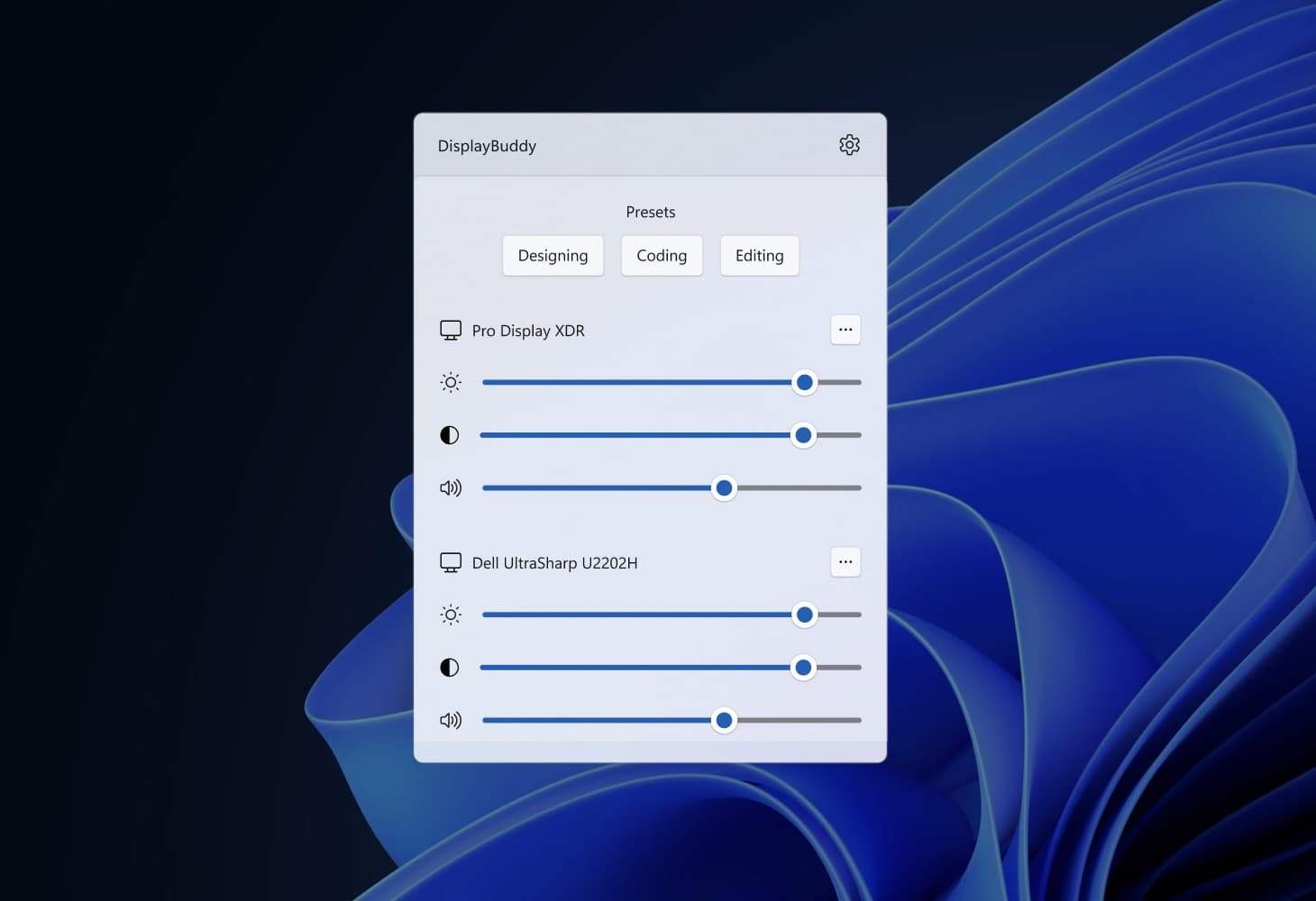
The biggest feature gap between DisplayBuddy and Twinkle Tray is Presets. DisplayBuddy lets you save your preferred brightness, contrast, and volume settings as a preset and switch between them instantly.
- Working during the day with bright overhead lights? One preset.
- Movie night with dimmed lights? Another.
- Presentation mode for a client call? A third.
Twinkle Tray lets you adjust brightness on a schedule or link brightness across monitors, but it does not offer saved presets that combine brightness, contrast, and volume into a single configuration you can name and switch on demand.
Reliable Volume Control
Twinkle Tray supports volume control through DDC/CI, but it is not enabled by default. You need to dig into settings to turn it on. Even after enabling it, users frequently report that volume control is unreliable: sliders jump between 0% and 100% on certain monitors, or the volume mapping does not match what the monitor actually outputs.
DisplayBuddy controls brightness, contrast, and volume from one interface with consistent, reliable behavior.
Brightness Sync Across All Settings
Twinkle Tray can link brightness sliders so all monitors adjust together, and it can normalize brightness ranges across different monitor models. But it only syncs brightness. If you also want contrast and volume to stay consistent across all your displays, DisplayBuddy handles that through its Sync feature, which is the second most-used feature after Presets.
Cross-Platform: Mac and Windows
Twinkle Tray is Windows-only. If you also use a Mac (or plan to), DisplayBuddy runs on both Mac and Windows with a single license and the same interface and feature set on both platforms.
HDR Brightness Control
When Windows HDR is enabled, Twinkle Tray's standard DDC/CI brightness slider stops working. The v1.17.0 update added an "SDR brightness" slider that adjusts the SDR content brightness on HDR displays, but this is a workaround, not true HDR brightness control. Many users report issues with the SDR slider resetting after sleep or not working on all monitors.
DisplayBuddy maintains full brightness control when Windows HDR is enabled. This is a significant differentiator. If you use HDR for gaming, video editing, or media consumption, you do not need to choose between HDR and software brightness control.
What Is Twinkle Tray?
Twinkle Tray is a free, open-source Windows app created by developer Xander Frangos. It adds a brightness slider to the Windows system tray, letting you adjust external monitor brightness without touching the physical buttons on your display.
Key facts about Twinkle Tray:
- Open source on GitHub under the MIT license, with 7,900+ stars and 169 contributors
- Available on the Microsoft Store, GitHub, winget, Chocolatey, and Scoop
- Free with all features included (no paid tiers or subscriptions)
- Built on Electron, which accounts for its large install size (~88 MB)
- DDC/CI and WMI support for communicating with external and internal displays
- Brightness, contrast, and volume sliders in the system tray flyout (contrast and volume must be enabled in settings)
- Customizable hotkeys for brightness, contrast, volume, and power state
- Time-of-day scheduling for automatic brightness changes
- Input source switching from the flyout menu (added in v1.17.1)
- CLI support for scripting brightness changes
- Brightness normalization to match brightness ranges across different monitor models
How to Download Twinkle Tray
If you want to try Twinkle Tray:
Twinkle Tray is available as a free download from the Microsoft Store, from the GitHub releases page, or via package managers (winget, Chocolatey, Scoop). The GitHub installer is recommended by the developer. Your external monitor must support DDC/CI for Twinkle Tray to detect it, and DDC/CI must be enabled in the monitor's on-screen display settings.
Common Problems with Twinkle Tray
Twinkle Tray is a well-maintained app with regular updates, but users frequently run into these issues. These are the most reported problems across GitHub issues, Reddit, and Windows forums.
HDR Brightness Does Not Work
This is the most long-running issue with Twinkle Tray. When Windows HDR is enabled, the standard DDC/CI brightness slider stops controlling the monitor backlight. The developer has acknowledged this and added SDR brightness support in v1.17.0, but it only adjusts the SDR content brightness level, not the actual monitor backlight.
Users report several problems with the HDR/SDR implementation:
- The SDR slider does not appear on all HDR-capable monitors
- SDR brightness settings can reset after the monitor wakes from sleep
- Time-of-day scheduling may incorrectly lower HDR brightness, causing dimming during HDR games
- Some monitors show HDR as "Unsupported" in Twinkle Tray even when Windows shows HDR as enabled
"No Compatible Displays Found" Error
This is one of the most commonly reported errors. Users who have been using Twinkle Tray for months suddenly see this error with no changes to their setup. Common triggers include:
- Windows updates (particularly Windows 11 Insider builds)
- AMD GPU driver updates (Adrenalin updates have repeatedly broken DDC/CI communication)
- Waking from sleep or hibernation
- Connecting or disconnecting a secondary monitor
- Using USB-C or Thunderbolt docks
Common fixes include restarting Twinkle Tray, power-cycling the monitor, or rolling back GPU drivers.
Monitor Detection After Sleep
Even when monitors are initially detected, Twinkle Tray may lose connection after the PC goes to sleep or the monitor enters standby. The brightness sliders stop responding until Twinkle Tray is restarted or the monitor is power-cycled.
Volume Control Issues
While Twinkle Tray added volume control through DDC/CI, users report inconsistent behavior:
- Volume jumps between 0% and 100% with no intermediate values on certain monitors
- Volume slider values do not match the actual monitor volume (e.g., 23% in the app maps to 58% on the monitor)
- The volume feature disappears after updating to newer versions
Large Install Size
Twinkle Tray is built on Electron, which bundles an entire Chromium browser runtime. The current installer is approximately 88 MB. For context, similar tools like Monitorian are under 1 MB. This is a common criticism in user reviews and forum discussions.
Frequently Asked Questions
What is Twinkle Tray?
Twinkle Tray is a free, open-source Windows app that adds brightness sliders for external monitors to the system tray. It uses DDC/CI and WMI to communicate with your displays and supports features like hotkeys, time-of-day scheduling, per-app profiles, and contrast/volume control. It is available on the Microsoft Store and GitHub.
Is Twinkle Tray free?
Yes. Twinkle Tray is completely free and open-source under the MIT license. All features are included with no paid tiers or subscriptions. However, it lacks saved presets, reliable volume control, HDR brightness support, and Mac compatibility. DisplayBuddy covers all of these and works across both Windows and Mac.
Does Twinkle Tray work with HDR monitors?
Not fully. When Windows HDR is enabled, Twinkle Tray's standard brightness slider stops working. Version 1.17.0 added an SDR brightness slider for HDR displays, but it only adjusts SDR content brightness, not the actual monitor backlight. Users report that this feature does not work reliably on all monitors and can cause issues like brightness resetting after sleep. DisplayBuddy maintains full brightness control when Windows HDR is enabled.
Is Twinkle Tray safe?
Yes. Twinkle Tray is an open-source app with its code publicly available on GitHub under the MIT license. It has been downloaded millions of times from the Microsoft Store and GitHub. If security and professional support matter to you, DisplayBuddy is a commercially supported alternative with dedicated customer support.
Does Twinkle Tray work on Mac?
No. Twinkle Tray is a Windows-only application. There is no Mac or Linux version available. If you need monitor control on both Mac and Windows, DisplayBuddy supports both platforms with a single license.
Does Twinkle Tray use DDC/CI?
Yes. Twinkle Tray uses DDC/CI to communicate with external monitors and WMI for internal laptop displays. DDC/CI must be enabled in your monitor's on-screen display settings for Twinkle Tray to detect and control it. Not all connection types support DDC/CI (VGA, some USB-C docks, and Miracast wireless connections are not compatible).
What is the best Twinkle Tray alternative?
DisplayBuddy is a comprehensive alternative to Twinkle Tray that adds advanced presets, reliable volume control, input source switching, brightness sync, and cross-platform Mac and Windows support. It also supports all Apple displays on Windows — including the new 2nd gen Studio Display, Studio Display XDR, and Pro Display XDR — which Twinkle Tray cannot control. For a free Windows-only alternative, Monitorian is also popular, though it has its own HDR limitations.
Does Twinkle Tray work with Apple Studio Display on Windows?
Only partially. Twinkle Tray can adjust brightness on the original Apple Studio Display (first generation, released in 2022), but it cannot control contrast or volume on that display. Twinkle Tray does not support the 2nd generation Studio Display (2026), the Studio Display XDR, or the Pro Display XDR at all. DisplayBuddy supports all Apple displays on Windows using Apple's native USB protocol, with full brightness control and no Boot Camp drivers required.
The Verdict
Twinkle Tray gives you a brightness slider in the system tray. That is its strength. But the moment you need more, the gaps show up fast: no saved presets, buggy volume control, broken HDR brightness, frequent monitor detection errors, no Mac support, and critically, no support for Apple's latest displays.
If you use an Apple Studio Display XDR, the 2nd generation Studio Display, or a Pro Display XDR with your Windows PC, Twinkle Tray simply cannot control them. It only supports the original 2022 Studio Display, and even then, only brightness — not contrast or volume. DisplayBuddy speaks Apple's native USB protocol and supports every Apple display on Windows out of the box.
DisplayBuddy gives you full control over every monitor on your desk. Save complete display configurations as presets and switch between them in one click. Sync brightness across all your monitors. Control volume and contrast reliably. Switch input sources. Keep brightness working when Windows HDR is enabled. And if you also use a Mac, the same app and the same license cover both platforms.
If you have been fighting with Twinkle Tray's volume bugs, HDR issues, "No compatible displays found" errors, or if you just bought an Apple display for your Windows setup and need brightness control, DisplayBuddy is the upgrade that just works.
Compare DisplayBuddy With Other Apps
DisplayBuddy
for Windows 10 or 11
Take control of your monitors
Control brightness, contrast, volume, and much more.
Get DisplayBuddy on the Microsoft Store